https://www.bing.com/webmasters/iNEXT ETS | PRACTICAL SEO GUIDE
10 Best SEO Tools in 2026 for Keyword Research, Audits and Competitor Analysis
iNEXT ETS | PRACTICAL SEO GUIDE
Free and paid options for keyword research, website audits, competitor analysis and search performance
Who this guide is for
Small-business owners, marketers, content planners and growing SEO teams who want to choose tools based on the task—not just the biggest feature list.
Quick recommendation
Start with Google Search Console, Google Analytics 4, Google Keyword Planner and PageSpeed Insights. Add a paid platform only when competitor research, backlink analysis, reporting or scale creates a clear need.
Prepared for publication by iNext ETS • Updated: 26 October 2026
Tool features and access rules can change. Confirm the provider's current documentation before purchasing or publishing pricing claims.
The best SEO tool depends on the job you need to do: measure Google search performance, discover keyword opportunities, audit technical issues, analyse competitors or understand what visitors do after arriving on your website. For many small businesses, a free toolkit built around Google Search Console, Google Analytics 4, Keyword Planner and PageSpeed Insights is a sensible starting point. Paid platforms such as Ahrefs and Semrush become useful when deeper competitor, backlink or reporting data justifies the cost. This guide compares 10 tools by use case, access, strengths and limitations so you can choose a practical setup for your website and budget.
Quick comparison: which SEO tool should you choose?
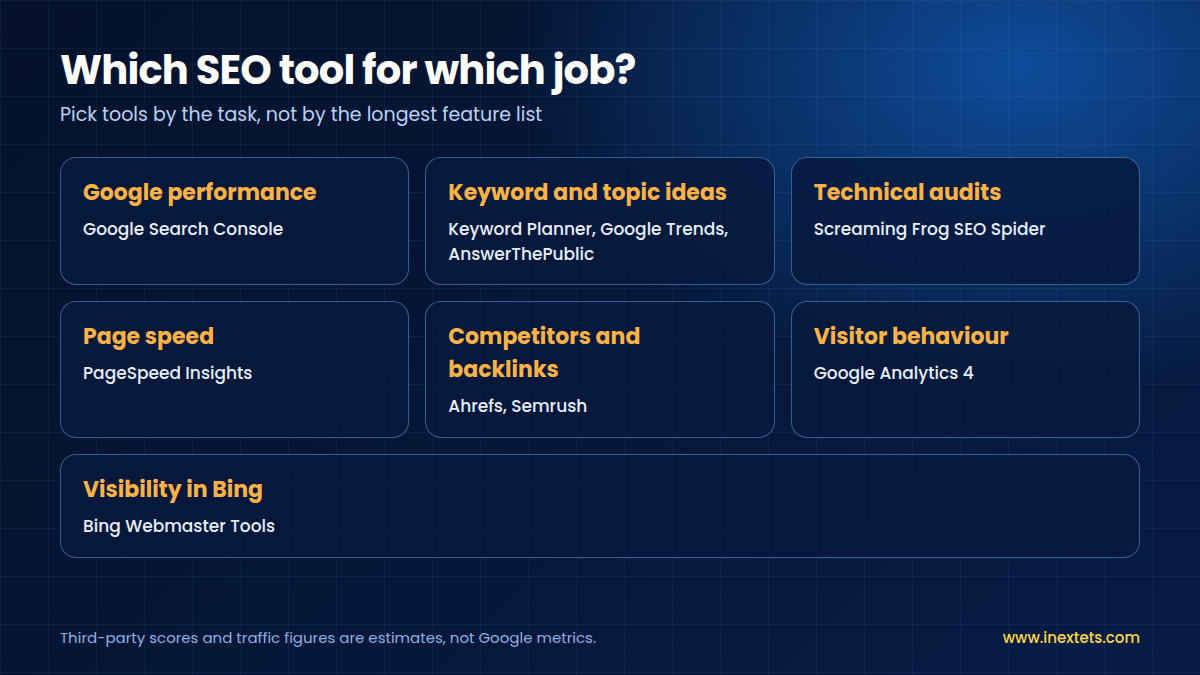
| Tool | Best for | Access and limits | Best starting user |
|---|---|---|---|
| Google Search Console | Google organic performance and indexing | Free; requires site verification | Any site owner |
| Google Keyword Planner | Keyword ideas and estimated demand | Free tool; account setup and access conditions apply | Advertisers and content planners |
| Google Trends | Relative interest and seasonality | Free; not exact search volume | Content and campaign planners |
| Google Analytics 4 | On-site behaviour and configured conversions | Core product free; setup required | Teams measuring outcomes |
| Ahrefs | Backlinks and competitor research | Paid plans; access varies | Growing SEO teams |
| Semrush | Keyword, competitor and visibility research | Free/paid access varies by feature and plan | Marketers and agencies |
| Screaming Frog SEO Spider | Technical crawling and on-page checks | Free crawl limit; paid licence unlocks more | Site owners and technical SEOs |
| PageSpeed Insights | Performance diagnostics and Core Web Vitals | Free; field data may not be available | Developers and site owners |
| Bing Webmaster Tools | Bing visibility and site diagnostics | Free | Sites targeting multiple search engines |
| AnswerThePublic | Question-led content ideas | Free/paid availability and limits can change | Blog and FAQ planners |
Note: Tool access, free-plan limits and prices can change by country, account and product tier. This guide avoids fixed prices where the provider's current plan can vary.
The 10 best SEO tools
1. Google Search Console
Best for: Understanding how your website performs in Google Search and identifying indexing or search-appearance issues.
What you can do
• Review clicks, impressions, click-through rate and average position for queries and pages.
• Find pages or queries with impressions but relatively weak clicks.
• Inspect URL indexing status and investigate eligible technical or discovery issues.
Free access and limitations: Free for verified website owners. Search Console reports provide useful Google Search data, but they do not show every query or explain every ranking change.
When to consider a paid plan or more advanced setup: Most businesses do not need to upgrade to use Search Console; invest in analysis, tracking and implementation around the data instead.
Example use case: If a service page receives impressions for relevant searches but few clicks, review whether its title and description clearly answer the searcher's need.
Official website: https://search.google.com/search-console
2. Google Keyword Planner
Best for: Discovering keyword ideas and estimating search demand, especially when planning Google Ads alongside content.
What you can do
• Generate keyword ideas from seed phrases or a website.
• Review estimated monthly searches and advertising-related estimates.
• Group related phrases into topic clusters and campaign themes.
Free access and limitations: The tool is free, but Google Ads account setup and billing-information conditions can apply to access. Search-volume figures are estimates and may be grouped or shown as ranges depending on account conditions.
When to consider a paid plan or more advanced setup: Consider paid SEO research software when you need organic competitor analysis, backlink data or large-scale keyword tracking—not just basic keyword ideas.
Example use case: For a service business, compare phrases such as "website development company" and "SEO services" with relevant location modifiers, then check the live search results to understand intent.
Official website: https://ads.google.com/home/tools/keyword-planner/
3. Google Trends
Best for: Comparing relative interest over time, spotting seasonality and checking whether a topic is rising or declining.
What you can do
• Compare up to several search terms or topics.
• Review interest by time period and geography.
• Explore related and rising queries for content planning.
Free access and limitations: Free. Trends reports relative search interest, not absolute monthly search volume. A value of 100 represents peak popularity in the selected comparison and period.
When to consider a paid plan or more advanced setup: No paid upgrade is required for basic trend checks. Combine Trends with Search Console and keyword research estimates for a more complete view.
Example use case: Before creating a seasonal campaign, compare topic interest over multiple years rather than assuming a short-term spike represents lasting demand.
Official website: https://trends.google.com/trends/
4. Google Analytics 4 (GA4)
Best for: Understanding what visitors do after arriving on a website and whether visits lead to meaningful business actions.
What you can do
• Review traffic acquisition and landing-page engagement.
• Configure events for actions such as form submissions or contact clicks where appropriate.
• Compare channels and landing pages by meaningful outcomes, not traffic alone.
Free access and limitations: The standard GA4 product is available without a subscription, but correct implementation, consent settings and event configuration matter. Unconfigured or inaccurate events can produce misleading reports.
When to consider a paid plan or more advanced setup: Most small businesses should first fix measurement and reporting. Consider additional analytics or reporting tools only when your requirements justify them.
Example use case: If a blog attracts readers but does not assist enquiries, review landing pages, internal links and configured conversion events before judging the content a failure.
Official website: https://analytics.google.com/
5. Ahrefs
Best for: Backlink analysis, competitor research, keyword discovery and tracking SEO opportunities.
What you can do
• Explore backlink profiles and referring domains.
• Compare competitor pages and topics.
• Research keywords and inspect content opportunities, depending on plan.
Free access and limitations: Ahrefs offers paid plans and some limited free tools. Available data, project limits and features vary by plan; confirm current terms on its official pricing page.
When to consider a paid plan or more advanced setup: Upgrade when competitor and backlink insights are part of a recurring workflow and the team can act on the findings. Do not buy it just to collect scores.
Example use case: Compare the pages ranking for a target service keyword and look for missing subtopics or useful resources your page could cover better.
Official website: https://ahrefs.com/
6. Semrush
Best for: A broad SEO and digital-marketing workflow covering keyword research, competitor visibility, site audits and reporting.
What you can do
• Research keyword and competitor opportunities.
• Run site audits and prioritise reported issues.
• Track selected keywords and prepare reports, depending on plan.
Free access and limitations: Some tools have limited free access; more extensive data and workflows require a paid plan. Limits and product bundles change, so verify the plan details before purchase.
When to consider a paid plan or more advanced setup: Consider a subscription when several recurring tasks—research, auditing and reporting—can be managed more efficiently in one platform.
Example use case: Use competitor research to build a content gap list, then manually validate whether each topic fits your audience and services.
Official website: https://www.semrush.com/
7. Screaming Frog SEO Spider
Best for: Technical crawling for titles, metadata, broken links, redirects, duplicate elements and other crawlable page issues.
What you can do
• Crawl a site to identify broken links and response codes.
• Review page titles, meta descriptions, directives and duplicate elements.
• Export findings to prioritise fixes with a developer or content team.
Free access and limitations: The free version crawls up to 500 URLs. A paid licence unlocks more URLs and advanced features. The desktop crawler is most useful when the site is crawlable and the person reviewing results understands the issues.
When to consider a paid plan or more advanced setup: A licence becomes more useful for larger websites, repeated audits, saved crawls, integrations or advanced extraction.
Example use case: Run a crawl after a website update and review broken internal links, missing titles and duplicate metadata before spending time on lower-impact warnings.
Official website:https://www.screamingfrog.co.uk/seo-spider/
8. Google PageSpeed Insights
Best for: Checking page performance diagnostics and Core Web Vitals signals for mobile and desktop experiences.
What you can do
• Review lab diagnostics and performance opportunities.
• Check field data when enough real-user data is available.
• Use findings to discuss image, script, layout and loading issues with developers.
Free access and limitations: Free. A URL may not have enough field data for a field-data report, and a single score is not a complete measure of user experience or SEO.
When to consider a paid plan or more advanced setup: No paid tool is needed for basic checks. Use specialist monitoring if you need recurring alerts or performance reporting across many URLs.
Example use case: Test a key landing page on mobile, identify the largest bottleneck and retest after a meaningful fix instead of chasing a perfect score in isolation.
Official website: https://pagespeed.web.dev/
9. Bing Webmaster Tools
Best for: Monitoring a website's presence in Bing and accessing search diagnostics outside Google.
What you can do
• Review Bing search performance where reports are available.
• Inspect site diagnostics and crawl-related information.
• Submit sitemaps and use supported URL inspection tools.
Free access and limitations: Free. Data and features are specific to Bing and may differ from Google Search Console.
When to consider a paid plan or more advanced setup: A paid upgrade is generally not needed for the core platform; the main investment is time to review and resolve relevant issues.
Example use case: For a site that wants visibility across search engines, verify the site and check whether Bing surfaces useful queries or technical issues not noticed elsewhere.
Official website: https://www.bing.com/webmasters/
10. AnswerThePublic
Best for: Finding question-led topic ideas and understanding how people phrase informational searches.
What you can do
• Explore questions and related phrases around a seed topic.
• Use question clusters to plan FAQs, explainers and supporting articles.
• Validate ideas against search intent and your own audience before writing.
Free access and limitations: Free access and paid-plan limits can change. Check the current pricing page for search quotas, exports and included features.
When to consider a paid plan or more advanced setup: Consider paid access if content planning is frequent enough that the extra volume, exports or collaboration features save time.
Example use case: For "website not generating leads," build separate content around conversion tracking, landing-page clarity, mobile experience and calls to action—if those topics fit your services.
Official website:https://answerthepublic.com/
Which SEO tools should you use together?
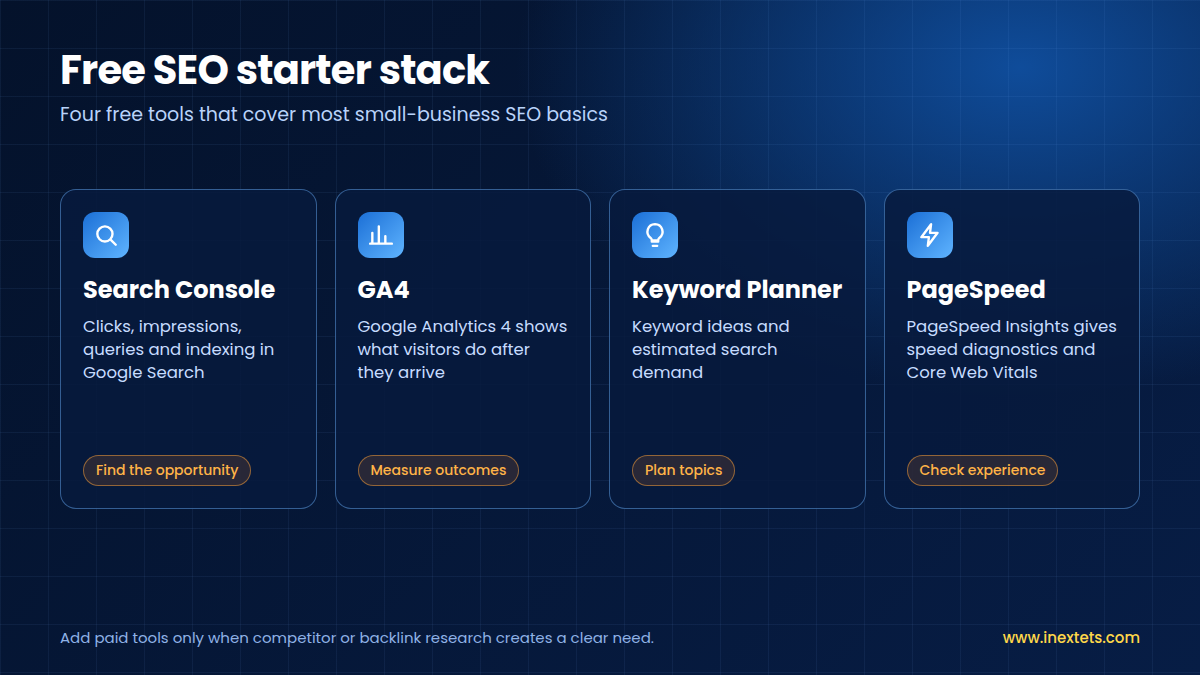
For a small business, the best stack is usually a few tools used consistently—not every platform available.
• Starting free stack: Search Console + GA4 + Keyword Planner + PageSpeed Insights.
• Content planning: Keyword Planner + Trends + AnswerThePublic, followed by a manual search-intent review.
• Technical checks: Screaming Frog + Search Console + PageSpeed Insights.
• Competitor and backlink research: Ahrefs or Semrush, selected according to your team's needs and budget.
Do not treat one tool's keyword difficulty score, traffic estimate or performance score as a final verdict. Combine data sources, review actual search results and decide what to do next.
A simple 30-minute SEO check for a small business
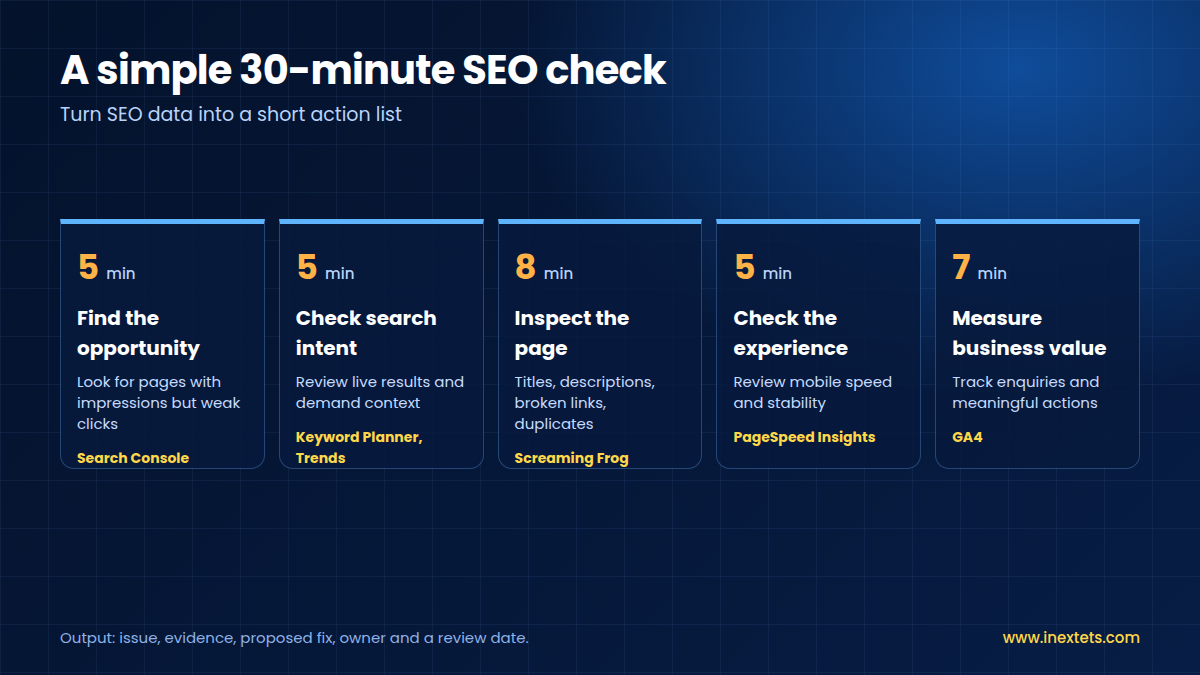
Use this repeatable workflow to turn SEO data into a short action list. It is a practical process—not a claim that a specific site has been tested.
1. Find the opportunity — 5 minutes
Open Search Console and look for pages with impressions but weak clicks, or relevant queries where the page's message could be clearer. Check the date range and compare like-for-like periods before drawing conclusions.
2. Check search intent — 5 minutes
Review the current search results for the target phrase. Use Keyword Planner or Google Trends for demand context. Do not treat Google Ads competition as the same thing as organic ranking difficulty.
3. Inspect the page — 8 minutes
Use Screaming Frog to review crawlable titles, descriptions, broken links and duplicate elements. Prioritise problems that affect users, search-engine access or the page's ability to answer the query.
4. Check the experience — 5 minutes
Run PageSpeed Insights and review the mobile experience. A high score alone does not guarantee better rankings; fix the issues that materially affect speed, stability and usability.
5. Measure business value — 7 minutes
Check GA4 with correctly configured events to monitor enquiries or other meaningful actions. Judge progress by qualified leads and outcomes as well as traffic.
The output should be a short priority list: the issue, evidence, proposed fix, owner and a date to review the result.
Example action list
| Finding | Possible action | Measure after change |
|---|---|---|
| Relevant impressions, low CTR | Rewrite title and description to match intent; avoid misleading claims | CTR and clicks over a comparable period |
| Broken internal links | Repair or redirect links where appropriate | Crawl results and user journey |
| Slow key landing page | Investigate the largest performance bottleneck | Field data when available and user experience |
| Visits but few enquiries | Check message clarity, form friction and event tracking | Valid enquiry events and lead quality |
Want help turning SEO data into a practical action plan? Explore iNextETS' SEO services, website development and digital marketing pages to understand how research, technical improvements and useful landing pages can work together.
How to choose the right SEO tools
Before paying for a platform, answer these questions:
• What decision will it help me make? Examples include choosing a topic, finding a technical issue or understanding which page attracts qualified leads.
• Do I already have this data? Search Console and GA4 may answer many basic performance questions at no software cost.
• Will I use it regularly? A subscription is harder to justify if the team rarely opens the platform or cannot act on its findings.
• Are the metrics estimates? Third-party traffic, difficulty and backlink metrics are useful for comparison, but they are not Google measurements or ranking guarantees.
• Can I verify the result? Use actual site data, a documented workflow and a follow-up review rather than assuming a tool's score proves success.
The strongest SEO setup is not necessarily the most expensive. It is the one that helps your team identify the right problem, make a sensible change and measure what happened next.
How iNext ETS can help connect SEO with website growth
SEO tools help you see opportunities, but the next step is turning those findings into a useful website experience. iNext ETS presents services across SEO, website development and digital marketing. For businesses evaluating their online presence, these areas can work together: research can inform page content, technical improvements can support usability, and clearer landing pages can help visitors understand the next step.
Explore relevant iNext ETS services:
• SEO services — SEO strategy and search visibility.
• Website development — responsive, performance-conscious and SEO-aware website solutions.
• Digital marketing — inbound marketing, content and lead-generation pathways.
Ready to improve your website's search visibility? Visit www.inextets.com or call +91 99811 22493 to discuss your digital requirements.
This is a service invitation, not a promise of a specific ranking or lead outcome. Results depend on the website, market, competition, implementation and measurement.
.
Editorial note
This guide is a practical comparison based on the tools' stated purposes and official provider resources. It does not claim independent benchmark testing, first-hand performance results or guaranteed SEO outcomes. Tool features and access terms can change; recheck provider documentation before publication.
SEO outcomes cannot be guaranteed. Accuracy, usefulness, site quality, competition, indexing and implementation all affect performance. Use actual data after publishing to keep improving the page.
iNext ETS • www.inextets.com • +91 99811 22493