Cybersecurity Threats for Small Businesses in 2026: 8 Risks Every Business Should Know
A practical guide to common cyber risks, prevention measures and business security solutions.
Author: INEXTETS Editorial Team | Published: 30 october 2026 | Last reviewed: 30 october 2026
A business does not need to be a large corporation to become a target of a cyberattack. Small businesses use email, websites, cloud platforms, payment systems and customer databases every day, and each connected system can introduce security risks. Understanding cybersecurity threats for small businesses is therefore essential for protecting customer information, business operations and digital assets.
A phishing email can expose login credentials. An unpatched application can provide attackers with a way into a network. A ransomware incident can make important files unavailable at the worst possible time. These are not only technical problems; they can interrupt services, affect customer trust and create unexpected recovery costs.
India's national cyber agency, CERT-In , has specifically advised Micro, Small and Medium Enterprises (MSMEs) to strengthen authentication, update systems, protect web infrastructure, secure networks, maintain offline backups and train employees. Its May 2025 advisory identifies ransomware, DDoS incidents, website defacement, data breaches and malware infections among the threats that can affect business operations.
For businesses in Bhopal and across India, cybersecurity should be treated as an ongoing business responsibility, not a one-time software purchase. This guide explains eight important risks, practical prevention steps, illustrative scenarios and how a structured security approach can help reduce exposure.
In This Guide
- Why Small Businesses Are Vulnerable
- 8 Major Cybersecurity Threats
- How to Improve Cybersecurity
- Small Business Cybersecurity Checklist
- Why Cybersecurity Is a Business Priority
- Cybersecurity Services in Bhopal
- Frequently Asked Questions
- Final Thoughts
Why Are Small Businesses Vulnerable to Cybersecurity Threats?
Small businesses often rely on digital tools but may not have a dedicated security team, formal access policies or regular vulnerability reviews. Employees may use the same password across multiple accounts, software updates may be delayed, and old user accounts may remain active after staff changes.
Attackers can take advantage of these gaps. They may target a business directly, exploit a vulnerable website or compromise a supplier or employee account. A smaller organisation can also hold valuable information, including customer details, invoices, payment records, employee data and access to partner systems.
The 2025 Verizon Data Breach Investigations Report found ransomware in 88% of the SMB breaches analysed in its dataset. This is a finding from that report's sample, not a prediction that 88% of all small businesses will experience ransomware. It does, however, underline why smaller organisations should take business cybersecurity seriously.
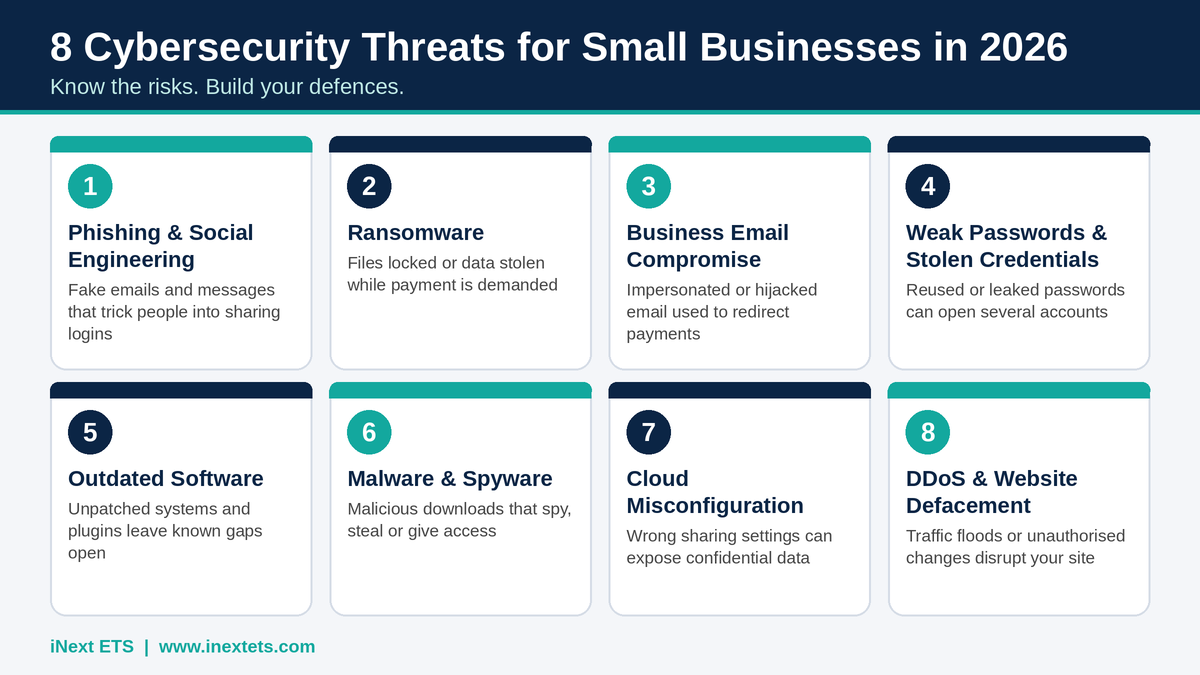
[Infographic: the eight cybersecurity threats covered in this article]
8 Major Cybersecurity Threats for Small Businesses in 2026
1. Phishing Attacks and Social Engineering
Phishing is a form of social engineering in which attackers use deceptive emails, text messages, calls or websites to trick people into sharing information, opening malicious files or approving fraudulent requests. Messages may appear to come from a bank, supplier, delivery service, colleague or company director.
A common example is an email asking an employee to review an invoice or verify an account through a link. The link may lead to a fake sign-in page designed to capture credentials. More targeted attacks may use information about the business to make the message appear genuine.
How to reduce the risk:
- Train employees to check sender details, links, attachments and unexpected requests.
- Verify urgent payment or account-change instructions using a separate, trusted channel.
- Enable multi-factor authentication (MFA) on email and other important accounts.
- Use email filtering and reporting processes so suspicious messages can be investigated.
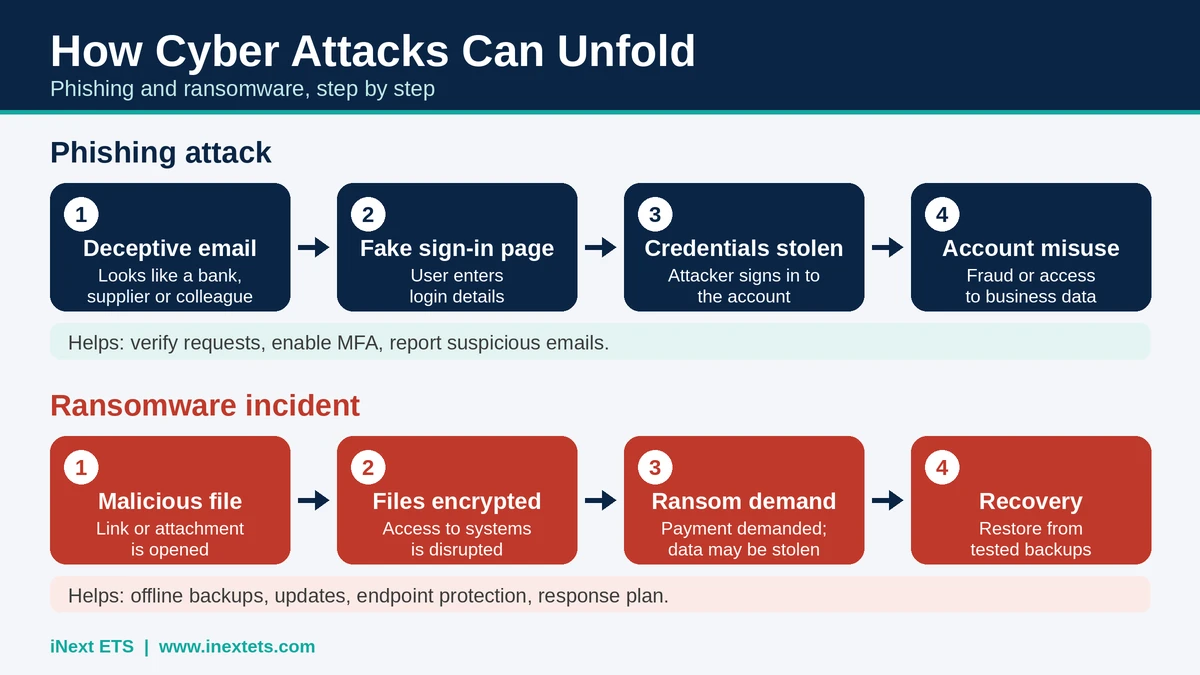
- Phishing: Deceptive email (looks genuine) → Fake sign-in page (user enters login) → Credentials stolen (attacker signs in) → Account misuse (fraud / data access)
- Ransomware: Malicious file (link or attachment) → Files encrypted (access disrupted) → Ransom demand (and data-theft threat) → Recovery (tested backups help)
2. Ransomware Attacks
Ransomware is malicious software that can encrypt files or disrupt access to systems while attackers demand payment. Some groups also steal information and threaten to publish it, creating a risk even when a business has backups.
For a small company, unavailable accounting records, project files, customer information or operational systems can delay work and affect service delivery. Paying a ransom does not guarantee that files will be restored or stolen data will be deleted.
Illustrative scenario (hypothetical example, not a real client incident): A Bhopal retailer opens an email attachment that appears to be a supplier invoice. Within hours, billing and stock records become inaccessible and a payment demand appears on screen. With no recent, tested offline backup, the shop struggles to issue invoices and track inventory while recovery is arranged.
How to reduce the risk:
- Maintain regular backups, including protected offline or isolated copies.
- Test restoration procedures instead of assuming backups will work.
- Apply security updates and restrict administrator privileges.
- Use endpoint protection and prepare an incident response plan.
3. Business Email Compromise (BEC)
Business Email Compromise involves impersonating or taking over a trusted business email account to manipulate payments, obtain sensitive information or redirect transactions. An attacker may pose as a supplier and send revised bank details, or impersonate a senior employee requesting an urgent transfer.
Because these messages can look like routine business communication, employees may act before noticing warning signs.
Illustrative scenario (hypothetical example, not a real client incident): A small digital marketing agency's email account is compromised after a staff member enters a password on a fake sign-in page. The attacker sends a client an invoice with changed bank details, and the client pays into the wrong account before the change is questioned.
How to reduce the risk:
- Confirm changes to bank details by calling a known, verified contact.
- Require a second approval for unusual or high-value payments.
- Enable MFA and review email forwarding rules and account access.
- Train finance and operations teams to recognise impersonation attempts.
4. Weak Passwords and Stolen Credentials
Short, reused or shared passwords make it easier for attackers to access business accounts. Credentials may be stolen through phishing, malware, data leaks or password-guessing attempts. If one password is reused across email, cloud storage and business applications, a single compromise can affect several services.
How to reduce the risk:
- Use long, unique passwords for every account and store them in a trusted password manager.
- Enable MFA, prioritising administrator, email, finance and cloud accounts.
- Remove access promptly when employees or contractors leave.
- Use role-based permissions so each person has only the access required for their work.
5. Outdated Software and Unpatched Vulnerabilities
Operating systems, website plugins, servers and business applications can contain security weaknesses. Developers release patches to fix known issues, but delayed updates leave systems exposed for longer. Attackers may scan for vulnerable public-facing services and exploit weaknesses that have already been documented.
The 2025 Verizon DBIR reported that exploitation of vulnerabilities accounted for 20% of breaches in its dataset, a 34% increase compared with the previous report. The finding reinforces the importance of timely patching and vulnerability management.
How to reduce the risk:
- Keep operating systems, applications, plugins and security tools updated.
- Maintain an inventory of devices, software and internet-facing systems.
- Remove unsupported or unused applications where possible.
- Conduct periodic vulnerability assessments and prioritise fixes by risk.
6. Malware, Spyware and Malicious Downloads
Malware is a broad term for software designed to damage systems, steal information, spy on users or provide unauthorised access. It can arrive through unsafe downloads, infected attachments, compromised websites or removable devices.
Spyware may collect information about user activity, while keyloggers can capture keystrokes. Trojans disguise malicious functions as legitimate programs. These threats can expose business accounts and sensitive information without obvious signs at first.
How to reduce the risk:
- Use reputable endpoint protection and keep it updated.
- Limit who can install software on company devices.
- Download applications only from trusted sources.
- Train employees to report unexpected device behaviour and suspicious files.
7. Cloud Security Misconfiguration and Data Exposure
Cloud platforms help teams store files, collaborate and access business applications remotely. However, cloud adoption does not automatically make information secure. Incorrect sharing permissions, exposed storage, weak authentication or excessive user access can expose confidential data.
Illustrative scenario (hypothetical example, not a real client incident): An online store keeps a spreadsheet of customer names, phone numbers and order details in a shared cloud folder. The folder's access setting is left as "anyone with the link", so the data can be viewed by people outside the business.
Illustrative scenario (hypothetical example, not a real client incident): An employee shares confidential business documents through a public link to save time while working with an outside vendor. The link is later forwarded or posted elsewhere, and the business has no record of who has opened the files.
How to reduce the risk:
- Apply role-based access and review permissions regularly.
- Restrict public links and external sharing for sensitive files.
- Enable MFA and monitor unusual sign-in activity.
- Understand the security responsibilities shared by the cloud provider and the business.
8. DDoS Attacks and Website Defacement
A Distributed Denial-of-Service (DDoS) attack attempts to overwhelm a website or online service with traffic from multiple sources, making it difficult for legitimate users to access it. Website defacement involves unauthorised changes to a website's appearance or content.
These incidents can interrupt enquiries, customer access and online operations. A compromised website may also damage brand credibility or expose visitors to further risks.
How to reduce the risk:
- Use suitable hosting, firewall controls and DDoS protection where required.
- Keep website software, plugins and administrator accounts secure.
- Monitor website availability and unusual traffic patterns.
- Maintain tested backups and a recovery process for public-facing assets.
How Can Small Businesses Improve Cybersecurity?
There is no single tool that prevents every attack. Effective small business cybersecurity combines technology, employee awareness, access control and preparation. The following steps provide a practical starting point, consistent with guidance from NIST and the FTC .
1. Enable Multi-Factor Authentication
Require MFA on important accounts, especially business email, cloud services, finance systems and administrator accounts. Where practical, consider phishing-resistant authentication for high-risk users and systems.
2. Build a Reliable Backup and Recovery Process
Identify essential business data, set a backup schedule and keep protected copies separate from everyday systems. Test recovery regularly so the organisation knows how long restoration may take and which services should be recovered first.
3. Update Systems and Manage Vulnerabilities
Assign responsibility for updates, track important software and address critical vulnerabilities promptly. Include websites, plugins, servers, employee devices and cloud-connected applications in the review. A periodic cybersecurity risk assessment helps prioritise what to fix first.
4. Train Employees Regularly
Short, practical training can help staff identify suspicious messages, verify unusual requests, handle information carefully and report incidents early. Security awareness should be repeated as attack methods change.
5. Review Access and Network Security
Use role-based access, remove dormant accounts, secure Wi-Fi and apply appropriate firewall and endpoint controls. Separate guest access from internal business systems where appropriate.
6. Prepare an Incident Response Plan
Document who should be contacted, how affected systems can be isolated, how evidence should be preserved and how the business will communicate with employees, customers and relevant authorities. Review the plan and test it periodically.
7. Assess Suppliers and Third-Party Access
External vendors and service providers may connect to business systems or handle sensitive information. Review what access they need, protect integrations and remove permissions that are no longer required.
Small Business Cybersecurity Checklist
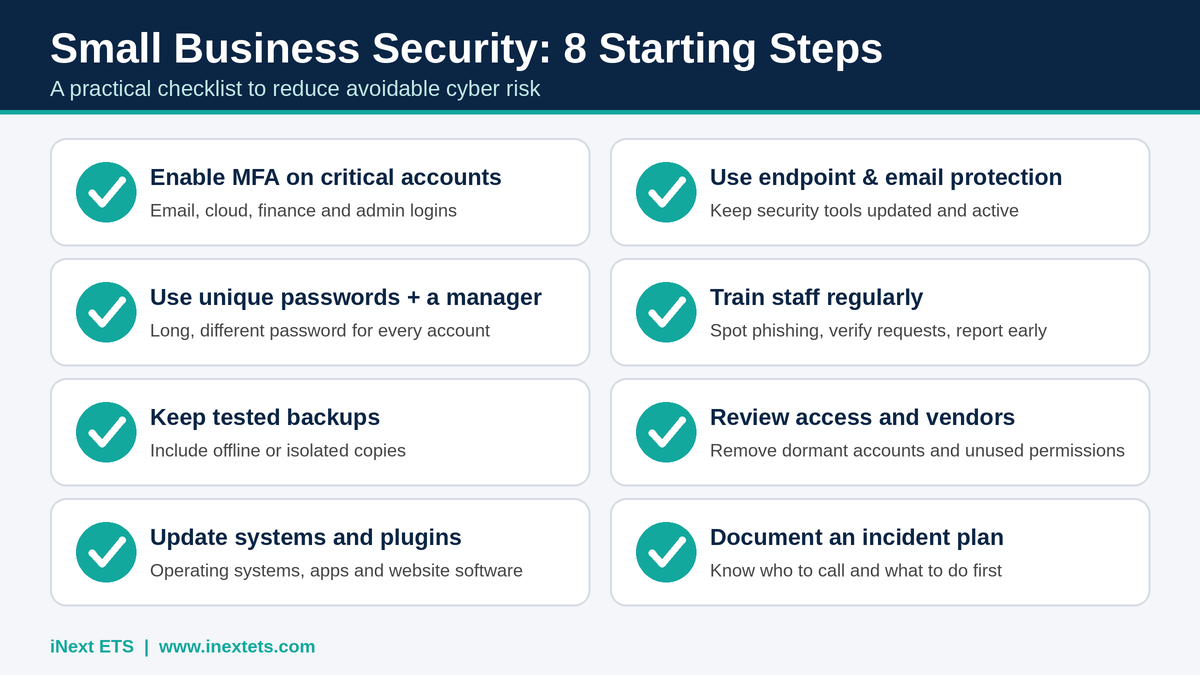
- MFA is enabled on critical accounts.
- Employees use unique passwords and approved password-management practices.
- Important data is backed up and restoration has been tested.
- Operating systems, applications and website components are updated.
- Endpoint protection and email security controls are maintained.
- Employees receive cybersecurity awareness training.
- User permissions and third-party access are reviewed.
- Website, network and cloud configurations are checked periodically.
- An incident response and business recovery plan is documented.
If several of these controls are missing, begin with the highest-impact gaps: account security, backups, patching and employee awareness. A risk-based plan is more useful than buying tools without understanding what they need to protect.
Why Cybersecurity Is a Business Priority
A cyber incident can affect more than computers. It may interrupt customer service, delay payments, expose confidential records and require time-consuming recovery work. For businesses that depend on digital systems, information security is closely connected to business continuity and customer confidence.
The goal of cybersecurity is not to promise that attacks will never happen. It is to reduce avoidable weaknesses, make suspicious activity easier to identify and help the organisation recover more effectively if an incident occurs.
Cybersecurity Services in Bhopal: What Local Businesses Should Protect
Bhopal's business community spans retail, education, healthcare, real estate, manufacturing, startups and MSMEs. Their operations differ, but many depend on the same kinds of digital assets, and any of them can be affected by the threats described above. The table below links common sectors to the information they typically need to protect. It is a general guide and does not refer to local incident statistics.
| Sector | Digital assets commonly worth protecting |
|---|---|
| Retail & e-commerce | Customer records, payment information, billing and inventory systems, online store |
| Education | Student and parent records, fee data, email accounts, learning platforms, website |
| Healthcare | Patient records, appointment and billing systems, email, diagnostic files |
| Real estate | Client documents, property and contract files, payment details, email, website enquiries |
| Manufacturing | Operational and production files, supplier and vendor access, invoices, email |
| Startups & MSMEs | Customer data, cloud storage, email, websites, financial records, partner access |
Businesses looking for cybersecurity services in Bhopal need more than a generic promise of protection. They need to understand which parts of their digital environment require attention, where vulnerabilities may exist and what steps can improve their security posture. To discuss your own environment, you can contact iNext ETS directly.
How iNext ETS Helps Businesses Strengthen Digital Security
iNext ETS provides cybersecurity services (https://www.inextets.com/cyber-security) for organisations seeking to protect digital assets, business networks and critical information, from startups and MSMEs to established organisations. Its offering covers six areas, each addressing a different part of business security. Exact scope depends on the engagement and is agreed with each client.
| Service | Scope and typical deliverable |
|---|---|
| Threat Detection and Response | Identifies suspicious behaviour across relevant systems and defines how an incident is contained and investigated. Typical deliverables include monitoring of in-scope systems and a defined response process. |
| Network Security | Protects the systems and connections employees use to reach business resources. Typical deliverables include a network review and firewall and access configuration recommendations or implementation. |
| Data Protection | Reduces the risk of customer, financial and employee data being exposed or misused. Typical deliverables include access restrictions, encryption where appropriate and data-loss controls. |
| Vulnerability Management | Finds weaknesses in applications, infrastructure and configurations, then prioritises fixes. Typical deliverables include a vulnerability assessment and a risk-ranked remediation list. |
| Access Control | Ensures employees and service providers have permissions appropriate to their roles. Typical deliverables include an access review and role-based permission setup. |
| Incident Response | Establishes how a business reacts when suspicious activity or a breach is discovered. Typical deliverables include a documented response plan and guidance on containment and recovery. |
iNext ETS positions its offering around proactive protection, security expertise, monitoring and compliance readiness. Its service page also describes 24/7 monitoring and end-to-end protection; businesses should confirm the precise scope, service coverage and response commitments for their requirements before engagement.
Is Your Business Protected Against Cyber Threats?
Cyberattacks can affect businesses of every size. Contact iNext ETS to discuss your business data, networks and digital security requirements.
Call: +91 99811 22493 | Web: www.inextets.com | Contact iNext ETS
MP Nagar, Bhopal, Madhya Pradesh.
Final Thoughts
Cybersecurity threats for small businesses are not limited to large-scale data breaches or sophisticated attacks. A convincing phishing message, reused password, exposed cloud folder or delayed software update can create an entry point for attackers. Businesses can reduce avoidable risk by combining strong authentication, tested backups, timely updates, employee awareness and a clear response plan.
If your organisation wants to strengthen its digital environment, start by identifying the systems and information that matter most. Then prioritise the security measures that address your actual risks.
Looking for cybersecurity services in Bhopal? Contact iNext ETS to discuss business cybersecurity, network security, data protection and threat response requirements.
iNext ETS – Protecting Digital Assets. Strengthening Business Security.
Call: +91 99811 22493 | Website: https://www.inextets.com